Notice: Function _load_textdomain_just_in_time was called incorrectly. Translation loading for the jetpack domain was triggered too early. This is usually an indicator for some code in the plugin or theme running too early. Translations should be loaded at the init action or later. Please see Debugging in WordPress for more information. (This message was added in version 6.7.0.) in /home/exas/public_html/exastore.ca/wp-includes/functions.php on line 6131

Notice: Function _load_textdomain_just_in_time was called incorrectly. Translation loading for the woocommerce domain was triggered too early. This is usually an indicator for some code in the plugin or theme running too early. Translations should be loaded at the init action or later. Please see Debugging in WordPress for more information. (This message was added in version 6.7.0.) in /home/exas/public_html/exastore.ca/wp-includes/functions.php on line 6131

Notice: Function _load_textdomain_just_in_time was called incorrectly. Translation loading for the salient domain was triggered too early. This is usually an indicator for some code in the plugin or theme running too early. Translations should be loaded at the init action or later. Please see Debugging in WordPress for more information. (This message was added in version 6.7.0.) in /home/exas/public_html/exastore.ca/wp-includes/functions.php on line 6131

Warning: Cannot modify header information - headers already sent by (output started at /home/exas/public_html/exastore.ca/wp-includes/functions.php:6131) in /home/exas/public_html/exastore.ca/wp-includes/feed-rss2.php on line 8
Docking Stations – ExaSystems Store https://exastore.ca IT Equipment Mon, 28 Mar 2022 22:18:46 +0000 en-US hourly 1 https://wordpress.org/?v=6.9.4 204524000 LENTION USB C & USB A Docking Station with 5K+Dual 4K@60Hz HDMI+DisplayPort, Gigabit Ethernet, 6 USB 3.0, Aux+Mic Adapter https://exastore.ca/product/lention-usb-c-usb-a-docking-station-with-5kdual-4k60hz-hdmidisplayport-gigabit-ethernet-6-usb-3-0-auxmic-adapter/ https://exastore.ca/product/lention-usb-c-usb-a-docking-station-with-5kdual-4k60hz-hdmidisplayport-gigabit-ethernet-6-usb-3-0-auxmic-adapter/#respond Mon, 28 Mar 2022 22:18:46 +0000 https://exastore.ca/product/lention-usb-c-usb-a-docking-station-with-5kdual-4k60hz-hdmidisplayport-gigabit-ethernet-6-usb-3-0-auxmic-adapter/
Brand LENTION
Colour Black
Hardware interface USB, Ethernet, HDMI, USB 3.0
Compatible devices MacBook Air, MacBook Pro
Total USB ports 6
Item dimensions L x W x H 22.6 x 8.4 x 2.8 centimeters
Number of ports 13
Item weight 0.75 Pounds
Total HDMI ports 1
  • Up to Two Split Extend Screens (MST+SST) - CB-D92 docking station provides 6 USB 3.0, Gigabit Ethernet, HDMI + DP dual 4K output that support mirror and extend mode for Windows and Mac OS, separated microphone input and audio output. (Note: The DC 20V power adapter is necessary for use, but not provides charging to host devices)
  • Max 5K Resolution - When dual DisplayPort together to a single display: max 5120x2880@60Hz resolution. When dual DisplayPort (or dual HDMI, or 1 DP + 1 HDMI) to dual displays: max 4096x2160@60Hz resolution each. The new 10.0 release support Dual DisplayPort (5120x1440) displays with Windows 7, 8.1, 10 and Windows 10 IoT Enterprise
  • System Support - Windows 10, 8.1, 8, 7, Mac OS 10.7 and afterwards (10.13.4-10.13.6 has single extended display support with AirPlay). (NOT SUPPORT: Linux/Unix/Android devices, ARM based Windows OS devices - such as Surface RT). See product detail page and Display Link website for more System Requirements. Driver installation is needed
  • Universal Compatibility - The docking station supports most laptops with USB-C or USB 3.0 ports (Both USB-C to USB-C and USB 3.0 to USB-C cables are included), such as MacBook Air/Pro, MacBook 12, Surface Book/Pro/Go, Dell, HP, Lenovo, etc. If you do run into any problem, please don't hesitate to contact us
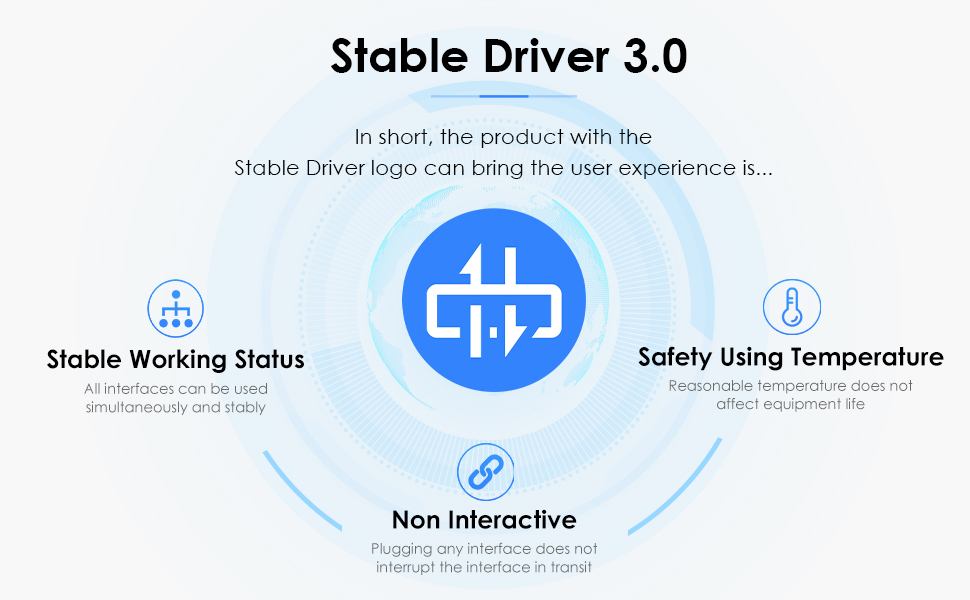
  • Stable Driver 3.0 Certified - LENTION published the advanced Stable Driver 3.0 standard to help customers buy with confidence. The standard included 3 main features: Non-Interference between connected peripherals, Sufficient power supply, and the Devices working under normal temperature without overheating
]]>

Product Description

D92
D92

Driver Installation

  • Download and install the latest driver from DisplayLink: www.displaylink.com/downloads before using.

Trouble Shooting

  • You can go to Displaylink Forum and get a professional answer whenever you come across technical issues from here: support.displaylink.com/knowledgebase
  • For any other issues, you can also reach us through Amazon Message or Our Official Website.

Systems Requirements

  • Mac OS 10.7/10.8/10.9/10.10/10.11/10.12/10.13/10.14/10.15 afterwards
  • Windows 7/8/8.1/10

No Support

  • Windows XP
  • Linux/Unix/Android
  • ARM based windows devices, such as Surface RT

Display Compatibility

  • Support Multi Stream Transport (MST) & Single Stream Transfer (SST) for Windows and Mac OS, Up to Two Split Extend Screens.
  • Better for web, product or productivity display, not recommended for gaming.
  • On single display mode, resolution of the single DP monitor is up to 5120 x 2880@60Hz through 2 DisplayPorts. On dual displays mode, resolution of each monitor is Max 4096×2160@60Hz.
  • If playing 4K contents, your device must be capable of decoding the 4K video in the graphics processor, recommend: Intel HD 4000, AMD Radeon HD 8650, NVidia GeForce 7xxM or better.
  • DisplayLink chipset has a CPU performance requirement, recommend: Intel Core i3 (or AMD A10) at 2.0GHz or better.

Reminder about Power

  • The DC 20V power adapter is necessary for use, but not provides charging to your devices. (No Charging)

Important Note for macOS: (Known Issues – Not Fully Fix Yet)

  • Users of 10.13.4-10.13.6 should use v4.3.x driver as it contains a workaround to enable one extended USB display (1080P) that support extend or mirror mode by using Apple AirPlay.
  • All MacBook 2018 models (Including Air & Pro, which based on Intel Coffee Lake chipset) running 10.14 can experience black extended display(s) with only mouse cursor. Driver v4.3 Beta 6 can force an AirPlay mirrored or extended display (1080P).
  • Mac OS 10.15 users may need to ensure the setting: the kernel extension is enabled and screen recording is also enabled, to make the docking continue to work when migrating to 10.15.

D92

D92

D92

D92

Stable Driver

About Stable Driver

The innovation of USB-C technology brings a revolutionary change to the whole electronic industry, which redefines how thin a device can be. More importantly, it makes the dream of One-Connect-All come true. A stable and reliable way to expand the USB ports is becoming more and more important. While the truth is, as the unregulated market growing, the All-In-One may become the One-Fails-All.

To solve these fatal problems, LENTION published the advanced industrial standard Stable Driver to help customers buy products with confidence. Stable Driver solved 3 main concerns from customers: Non-interference between different ports (from signal interference to Plug & Unplug interference), Sufficient power supply to support the peripherals working normally, and Working under reasonable temperature to maximize the lifespan of the device.

]]>
https://exastore.ca/product/lention-usb-c-usb-a-docking-station-with-5kdual-4k60hz-hdmidisplayport-gigabit-ethernet-6-usb-3-0-auxmic-adapter/feed/ 0 7824
CalDigit USB-C Pro Dock – 85W Charging, Thunderbolt 3, UHS II SD Card Slot, USB C Gen 2, USB A x 3, Dual DisplayPort 1.2, LAN, https://exastore.ca/product/caldigit-usb-c-pro-dock-85w-charging-thunderbolt-3-uhs-ii-sd-card-slot-usb-c-gen-2-usb-a-x-3-dual-displayport-1-2-lan/ https://exastore.ca/product/caldigit-usb-c-pro-dock-85w-charging-thunderbolt-3-uhs-ii-sd-card-slot-usb-c-gen-2-usb-a-x-3-dual-displayport-1-2-lan/#comments Sat, 26 Mar 2022 22:49:47 +0000 https://exastore.ca/product/caldigit-usb-c-pro-dock-85w-charging-thunderbolt-3-uhs-ii-sd-card-slot-usb-c-gen-2-usb-a-x-3-dual-displayport-1-2-lan/
Brand CalDigit
Hardware interface USB 1.0, USB 3.0, USB 2.0, USB 1.1
Compatible devices MacBook Pro
Total USB ports 3
Number of ports 2
Item weight 2.3 Pounds
Wattage 85 watts
  • [UNIVERSAL COMPATIBILITY] Can be used with computers with USB-C, Thunderbolt 3, or even USB-A. Perfect for IT environments utilizing both Windows and Macs **Functionality will vary depending on host connection. Please refer to the compatibility chart for more information
  • [10 PORTS OF CONNECTIVITY]: 1 x Thunderbolt 3 (Backwards Compatible with USB-C), 2 x DisplayPort 1.2, 3 x USB 3.2 Type A (5Gb/s), 1 x USB-C 3.2 Gen 2 (10Gb/s Data Only), Gigabit Ethernet, UHS-II SD Card Slot (SD 4.0), 3.5mm Combo Audio Jack. **USB-C Pro Dock does not have a downstream Thunderbolt 3 port
  • [POWERFUL 85W LAPTOP CHARGING]: Provides up to 85W to charge your laptop and power all of your USB peripherals [STAND ALONE CHARGING] USB-A ports can charge devices without being connected to a computer
  • [DUAL 4K EXTENDED DISPLAYS]: Connect up to two 4K@60Hz (4096 x 2160 30-bit color) monitors via DisplayPort 1.2 (**DisplayPort to HDMI/DVI/VGA adapter/cable must be an ACTIVE type.**)
  • [MAC & WINDOWS COMPATIBLE]: Ideal for 2016+ MacBook Pro, 2017+ iMac Pro or Windows Ultrabooks with Thunderbolt 3 or USB-C such as the Yoga, Spectre, XPS, Razer Blade
]]>

Whether your laptop is USB-C or Thunderbolt 3, the USB-C Pro Dock re-writes the rule book on what a docking solution is capable of by supplying dual monitors, charging, and connectivity for both types of computers.

]]>
https://exastore.ca/product/caldigit-usb-c-pro-dock-85w-charging-thunderbolt-3-uhs-ii-sd-card-slot-usb-c-gen-2-usb-a-x-3-dual-displayport-1-2-lan/feed/ 10 6847